


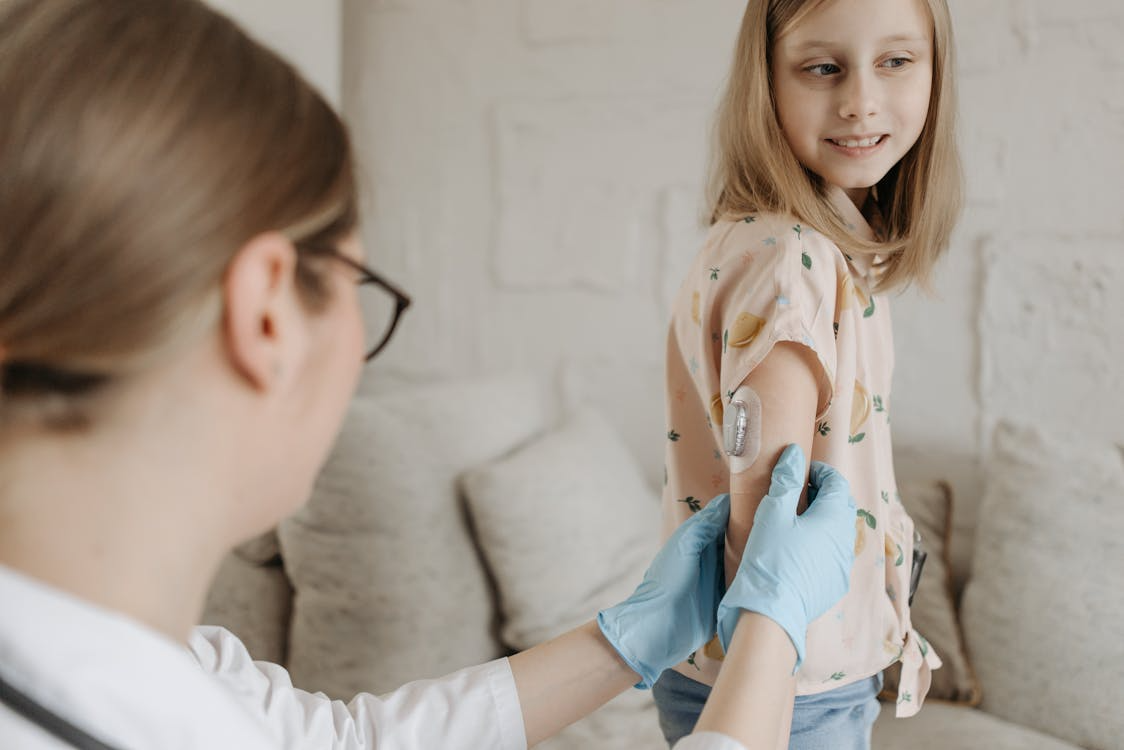
If you or someone you care for was recently diagnosed with diabetes, the letters "CGM" are probably showing up everywhere, and it can feel like a lot to take in at once. A continuous glucose monitor is one of the most valuable tools available for managing diabetes today, and understanding how it works makes it a whole lot less intimidating. This guide breaks down what a CGM is, how it differs from traditional blood sugar testing, and what it can actually do for your day-to-day life.
How a CGM Monitors Your Glucose Around the Clock
A CGM is a small wearable device that tracks your glucose levels continuously throughout the day and night, no fingerstick required for each reading. According to the CDC, CGMs measure glucose from the interstitial fluid (the fluid that surrounds the cells just beneath the skin) and send that data to a smartphone or receiver, typically updating every one to five minutes.
Here's a simple breakdown of how the process works:
- Sensor insertion: A small, flexible filament is inserted just under the skin, usually on the back of the upper arm or abdomen, using a quick-release applicator.
- Glucose detection: An enzyme in the sensor reacts with glucose in the interstitial fluid and produces a small electrical signal.
- Signal conversion: The transmitter converts that signal into a glucose reading.
- Data delivery: Readings are sent wirelessly to your smartphone, a dedicated receiver, or a compatible insulin pump.
Because CGMs measure interstitial fluid rather than blood directly, readings can run approximately 5 to 15 minutes behind blood glucose during rapid changes, such as right after a meal or during exercise. This is completely normal and expected with the technology.
Popular options like the Dexcom G7 sensor and the FreeStyle Libre 3 Plus sensor are factory-calibrated, meaning they don't require routine fingerstick calibration to function accurately.
CGM vs. Fingerstick Testing: What's the Difference?
Both CGMs and traditional blood glucose meters give you glucose readings, but they work very differently and serve different purposes. Understanding those differences can help you and your care team decide what role each plays in your management plan.
A traditional blood glucose meter requires a fingerstick to draw a small drop of blood. You get one reading at the moment you test, with no context about whether your glucose is rising, falling, or holding steady. It's a useful snapshot, but it tells you nothing about what happened between checks.
A CGM, by contrast, provides continuous readings every few minutes and displays trend arrows that show the direction and speed of glucose movement. It can alert you when glucose is climbing too high or dropping too low, including overnight when you're asleep. Some CGM systems also allow data to be shared with family members, caregivers, or your healthcare provider in real time.
Many modern CGMs are FDA-cleared for making treatment decisions without a confirmatory fingerstick. That said, a fingerstick can still be a useful backup when your symptoms don't match what the CGM shows or during periods of very rapid glucose change. If you're exploring your device options, the Dexcom G7 receiver and the FreeStyle Libre 2 reader are both popular standalone display options that don't require a smartphone.
What Real-Time Glucose Data Makes Possible
A CGM doesn't just replace fingerstick testing. It opens up a whole new level of insight into how your body responds to food, activity, stress, sleep, and medication. That visibility is one of the most meaningful shifts people notice after starting CGM use.
The American Diabetes Association highlights time in range (TIR) as a key metric that CGMs make possible. TIR measures the percentage of time your glucose stays within your target range, typically 70 to 180 mg/dL for most people, with a general goal of hitting that range at least 70 percent of the day (roughly 17 out of 24 hours). Your personal target may vary, so your provider will help set the right goal for you.
Here are some of the most meaningful benefits CGM users report:
- Trend visibility: See whether glucose is rising, falling, or stable and take action before levels go out of range.
- Customizable alerts: Set high and low alarms, including overnight alerts, to catch problems while you sleep.
- Reduced hypoglycemia risk: Early warnings help prevent severe low blood sugar events before they happen.
- Data sharing: Loop in family members, caregivers, or your healthcare provider so no one is managing alone.
- Fewer fingerstick tests: For many people, CGM significantly reduces the need for routine manual testing throughout the day.
- Better long-term outcomes: According to the ADA, people with both type 1 and type 2 diabetes who use a CGM tend to have fewer episodes of hypoglycemia and lower A1C levels overall.
If you're newer to CGM use or curious about all the options available, our Education page and Learning Center are great places to keep exploring.
Why This Technology Is Worth Understanding
Managing diabetes is a daily effort, and having the right information at the right time makes that effort more effective and less exhausting. A CGM doesn't manage diabetes for you, but it gives you the data to make smarter, more confident decisions across every part of your day. For caregivers and family members supporting someone with diabetes, real-time glucose visibility and shared data access can provide genuine peace of mind.
At Adapt Health Diabetes, we believe access to the right technology should be simple. That includes helping you get the CGM supplies you need covered through your insurance, with as little hassle as possible.
Frequently Asked Questions About CGMs
Is wearing a CGM painful?
The insertion is quick and most users describe it as a brief pinch, similar to a fingerstick but shorter. After that initial moment, the sensor is designed to stay comfortable during everyday activities, including sleep, exercise, and showering. If you experience ongoing discomfort at the insertion site, check your placement and consult your healthcare provider.
How long does a CGM sensor last before I need to replace it?
It depends on the device. Wear times typically range from 7 to 15 days depending on the brand and model. For example, the Dexcom G7 offers 10-day wear, while sensors in the Abbott FreeStyle Libre line offer up to 15 days. Rotating your insertion site with each new sensor helps support comfort and accuracy.
Do I still need to do fingersticks if I use a CGM?
Many modern CGMs are approved for making treatment decisions without a confirmatory fingerstick. However, it can still be a good idea to verify with a blood glucose meter if your symptoms don't match your CGM reading or during periods of very rapid glucose change. Your healthcare provider can help you decide when fingerstick confirmation makes sense for your specific situation.
Can I shower, swim, or exercise with a CGM?
Most CGM systems are water-resistant and designed to hold up during normal daily activities, including exercise, showering, and swimming. That said, limits vary by device, so always review the manufacturer's guidelines for your specific model. If adhesion is a concern during activity, over-patches are available to help keep the sensor secure.
Does insurance cover CGMs?
Many private insurance plans, Medicare, and Medicaid cover CGMs for people with diabetes who meet eligibility requirements, which typically include the type of diabetes diagnosis, insulin use, and a prescription from a healthcare provider. Coverage details vary, so it's worth checking with your insurer or reaching out to our team for help understanding your benefits.
Ready to Get Started with a CGM?
Adapt Health Diabetes makes it easy to order CGM sensors, readers, and transmitters through your insurance. Browse our full selection of Dexcom and Abbott FreeStyle Libre products, or visit our Resources page to learn more about what's available to you.
Have questions about coverage or which device is right for you? Contact our team and we'll walk you through it.
This article is for educational purposes only and does not replace professional medical advice. Always consult your healthcare provider regarding diabetes management decisions and device selection.
Sources
- Centers for Disease Control and Prevention. Continuous Glucose Monitors. CDC Diabetes. Updated November 2025.
- American Diabetes Association. CGM and Time in Range. ADA.
- American Diabetes Association. Continuous Glucose Monitoring: Benefits, Accessibility and How It Works. ADA.
- American Association of Diabetes Care and Education Specialists. CGM Glossary. danatech by ADCES.


